
Writing it down is only the beginning.
A long list can capture every obligation and still leave the important question unanswered: what should happen next? When client work, admin, personal plans, and half-formed ideas all sit together, everything can look equally urgent.
Finish Something starts from a gentler assumption. You do not need to organise your whole life before you can make progress. You need a quick place to catch what is in your head, enough room to clarify it, and a clear view of the work that deserves attention now.
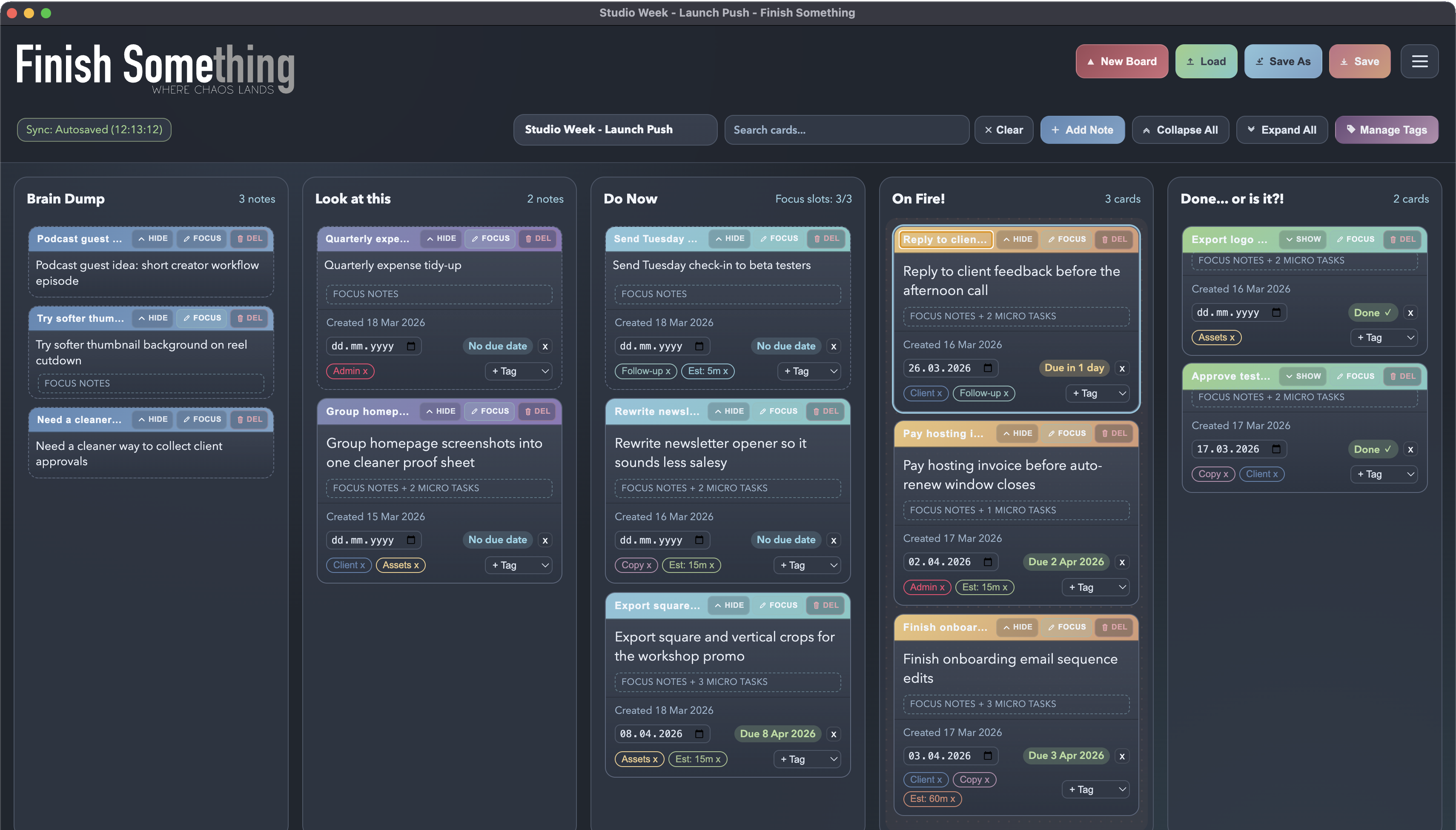
Five places for work to move.
The board is deliberately small. Each lane has a distinct job, so work can change state without disappearing into a deep hierarchy.
- Brain Dump catches thoughts quickly, before they vanish or demand a perfect description.
- Look at this holds ideas that need a little thought before they become commitments.
- Do Now keeps the work you have chosen close and visible.
- On Fire separates genuinely urgent or time-sensitive work from everything merely making noise.
- Done moves finished work out of the way while keeping progress tangible.
Start rough. Add detail when it earns its place.
A card can begin as one hurried sentence and stay that simple. When the work needs more shape, it can grow into Markdown notes, tags, a due date, and small checkable steps. The structure is available, but it is never the price of capturing an idea.
Adjustable lane limits can keep too much work from becoming active at once. Focused views, keyboard controls, and visual themes help the board fit the way you prefer to work without changing the basic system underneath.
Personal work, without project-management theatre.
Finish Something is designed for one person. It is not a team workspace, a performance dashboard, or a smaller version of enterprise project software. There are no members to manage, permissions to configure, or rituals to perform for the benefit of the system.
There is also no productivity doctrine to study. The board provides a useful amount of friction and visibility, then leaves room for your own judgement. Organising the work should not become another piece of work you need to organise.
Your board is a file.
Boards are saved as portable .fsboard files in a location you choose. They can stay on one computer, live on an external or encrypted drive, or sit inside a folder managed by your preferred sync service.
Finish Something does not provide a cloud account and does not host, inspect, or monetise your board. You decide where the file lives and how it is backed up. The app remains useful even when the internet is not involved.
It works alongside AI without trying to become AI.
You can paste Markdown into a card, copy useful notes back out, or use a .fsboard file as context in tools such as ChatGPT, Gemini, Grok, or Claude when you want help thinking through a project.
Finish Something itself does not send your board to an AI service. It stays focused on being the calm desktop surface where ideas land, decisions become visible, and finished work has somewhere to go.
For work that rarely arrives in a straight line.
Finish Something can suit freelancers, creatives, students, knowledge workers, independent professionals, and anyone balancing several kinds of responsibility at once.
It is especially useful when thoughts arrive faster than priorities, long task lists become hard to read, or maintaining a complicated system starts consuming the energy that was meant for the work itself.